
APEX is obviously a database centric product. It is one of the things we love about it because it makes handling data easy. Even so, there are times when we may want to limit the number of times we perform round trips to the server. Having an overly ‘chatty’ App can cause headaches to your server administrator and a poor experience for your users.
In this post I will talk about Web Storage, the apex.storage JavaScript API and how they can help us persist information locally so that we can reference it without performing that extra round trip to the server.

Before I get started, let me be clear. I am not talking about off-line Apps or even Progressive Web Apps (PWA’s). While I would love to be able to achieve pure off-line with APEX, I don’t see it happening in the near future. I am talking about improving regular on-line APEX Apps by reducing un-necessary chatter with the server.
About Web Storage and the apex.storage API
With web storage, web applications can store data locally within the user’s browser. Before HTML5, application data had to be stored in cookies, which are included in every server request. Web storage is more secure, and large amounts of data can be stored locally (at least 5MB), without affecting website performance.
In a nutshell apex.storage is an APEX provided JavaScript API which allows you to store and retrieve name value pairs in your browser’s web storage. The APEX team have also thought of things like having collections of name value pairs for different APEX Apps (or even pages and regions). You can even differentiate between values stored just for the current session (session storage) and values stored across sessions (local storage).
I could go on, but the 18.1 documentation (About local and session storage) provides a good background to the subject.
General Warnings

The most important warning is that you should not store any sensitive information in web storage, and I mean any. Not only is it easily accessible to the user of the PC but even the most basic XSS attack can access web storage on your user’s device.

Web storage is subject to your user clearing their cache. This means it cannot be relied on permanently. If a user clears their browser cache, all of the data stored will be lost. In view of this, you shouldn’t treat APEX storage as a database - just somewhere you can store your stuff for a while.

Finally, as with anything JavaScript related there are also browser support considerations. It does go as far back as IE 8 though, so you should be OK using it.
Use Cases
Saving User Preferences
In many applications, you need to save convenience data to help users complete repetitive tasks more efficiently. This typically comes in the form of default values. For example, when a user has to enter the same value day after day you can give them the option to save it for next time (and only change it when necessary) by storing the value in local storage. You avoid the need to do a round trip to the server to save the preference value and when you are getting the preference value.
Temporary Storage of User Selections
Let’s say your user is selecting from a number of choices in a list. Instead of sending each selection to the server via an Ajax call, you can store their selections in web storage. When they are done selecting, you can send the entire list to the server in one shot.
A Worked Example
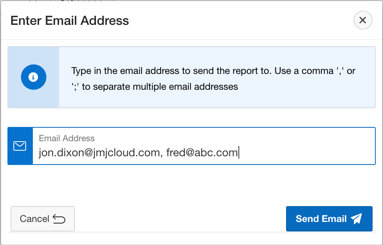
In a recent project, users wanted to be able to review and email a report (an APEX Interactive Report) to several colleagues on a daily basis. In order to prevent the user from having to type in the distribution list every day, we saved the last used distribution list locally to web storage. When the user logs in the next day to send the email again, we get the distribution list from web storage and set that distribution list as the default value.
The goal is that when a user opens the modal to send an email, the distribution list will be populated with the one they used last.
Setting a Value
/* Set a variable with the scoped local storage. */
var localStorage = apex.storage.getScopedLocalStorage({
  prefix: "MYAPP",
  useAppId: true
});

/* Assign the value of Page Item "P160_EMAIL_ADDRESS" to the scoped storage
   using the key value "Report_Dlist". If the value does not exist,
   it will be created */
var savedDlist = localStorage.setItem(
  "Report_Dlist",
  apex.item("P160_EMAIL_ADDRESS").getValue()
);
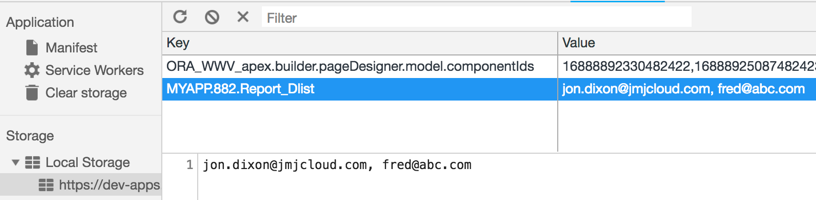
In the above call, we are applying a prefix of “MYAPP” and asking APEX to also include the App Id as part of the prefix. Within those prefixes, we could have hundreds of name value pairs for a given APEX App.
This is how the stored value looks in Chrome Developer Tools. You can see the key has been prefixed by the APEX API with the prefix I asked for ‘MYAPP’ and the App Id.
Getting a Stored Value
/* Set a variable with the scoped local storage */
var dgsLocalStorage = apex.storage.getScopedLocalStorage({
  prefix: "MYAPP",
  useAppId: true
});

/* Set a Page variable with the Report_Dlist key value */
var savedEmail = dgsLocalStorage.getItem("Report_Dlist");
apex.item("P160_EMAIL_ADDRESS").setValue(savedEmail);
Let’s check the value was set:
console.log(apex.item("P160_EMAIL_ADDRESS").getValue());
// Output: [email protected], [email protected]
Conclusion
Whilst not exhaustive, I hope this post has sparked some ideas and that you start thinking of web storage as another useful tool in your APEX toolbox.
Key takeaways:
- Never store sensitive data in web storage
- Use for convenience, not critical data persistence
- Scope appropriately using APEX’s built-in prefixing
- Consider session vs local storage based on your needs
The apex.storage API makes it easy to reduce server round trips while maintaining clean, organized client-side data storage.
Jon Dixon, Co-Founder JMJ Cloud