
Oracle REST Data Services (ORDS) provides many options for authenticating users. These include OAuth client, APEX User, Database Schema User and OS User. While it is important to ensure your ORDS web services are secured, you also need to consider what a client has access to once authenticated. As a quick reminder, authentication confirms your identity and allows you into the system, authorization decides what you can do once you are in. In this post, I will dive into roles and privileges and explain their part in authorizing access to ORDS web services for OAuth clients.

Overview
Let’s start with a diagram to show how roles and privileges fit into the overall OAuth security model for ORDS.
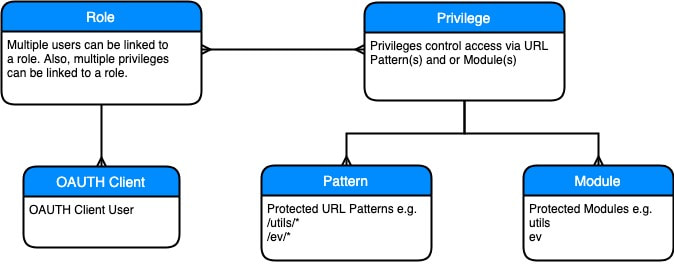
A role acts as the link between one or more users and one or more privileges. You assign a role to one or more OAuth clients.
A privilege details what is secured by that privilege. When creating a privilege, you can secure either an entire module or secure based on URL patterns.
A URL pattern is part of the full URL for a web service or group of web services. If you have a module called ‘ev’ then you can secure all services in that module using the URL pattern ‘/ev/*’.
Example
Take the following three modules in an ORDS enabled schema called ‘XXORDS’.
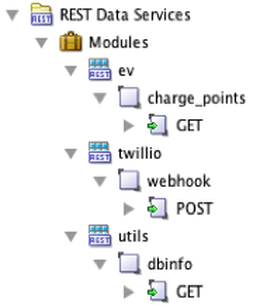
Let’s say we want to do achieve the following:
- Allow services in the twillio module to be completely open (i.e. no authentication)
- Protect the ‘utils’ and ‘ev’ modules
- Allow the OAuth client ‘ADMIN_CLIENT’ access to any services in the ‘utils’ and ‘ev’ modules
- Allow the OAuth client ‘EV_CLIENT’ access to services in the ‘ev’ module
Note: Prior to creating any privileges, all of your ORDS web services will be publicly accessible.
Roles
Based on the above, we will need to create two roles ‘ADMIN_ROLE’ and ‘EV_USER_ROLE’.
BEGIN
 ords.create_role (p_role_name => 'EV_USER_ROLE');
 ords.create_role (p_role_name => 'ADMIN_ROLE');
END;
/
-- Check roles were created.
SELECT * FROM user_ords_roles WHERE name IN ('EV_USER_ROLE', 'ADMIN_ROLE');
Privileges
We will also need to create two privileges. One to protect web services in the ‘ev’ module and one to protect web services in the ‘utils’ module.
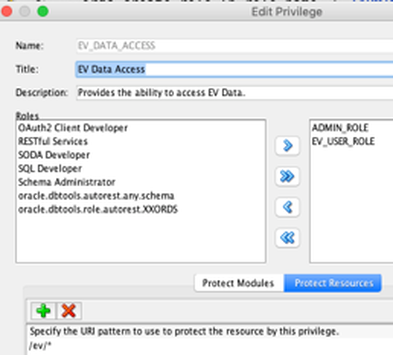
Privilege 1 - EV_DATA_ACCESS
While creating this privilege, we will at the same time, link the privilege to both the ‘EV_USER_ROLE’ and the ‘ADMIN_ROLE’ roles. An OAuth client associated with either of these roles will be able to call the charge points web service:
DECLARE
 l_priv_roles owa.vc_arr;
 l_priv_patterns owa.vc_arr;
BEGIN
 l_priv_roles(1) := 'EV_USER_ROLE';
 l_priv_roles(2) := 'ADMIN_ROLE';
 l_priv_patterns(1) := '/ev/*';

 ords.delete_privilege(p_name => 'EV_DATA_ACCESS');
 ords.define_privilege
 (p_privilege_name => 'EV_DATA_ACCESS',
 p_roles => l_priv_roles,
 p_patterns => l_priv_patterns,
 p_label => 'EV Data Access',
 p_description => 'Provides the ability to access EV Data.');
 COMMIT;
END;
Note: The pattern ‘/ev/*’ starts after the base URL for your ORDS enabled schema. In our case, this is anything after https://example.com/ords/xxords.
Privilege 2 - UTILS_DATA_ACCESS
While creating this privilege, we will only link the privilege to the ‘ADMIN_ROLE’ role. Only OAuth clients associated with this role will be able to call the ‘dbinfo’ web service:
DECLARE
 l_priv_roles owa.vc_arr;
 l_priv_patterns owa.vc_arr;
BEGIN
 l_priv_roles(1) := 'ADMIN_ROLE';
 l_priv_patterns(1) := '/utils/*';

 ords.delete_privilege(p_name => 'UTILS_DATA_ACCESS');
 ords.define_privilege
 (p_privilege_name => 'UTILS_DATA_ACCESS',
 p_roles => l_priv_roles,
 p_patterns => l_priv_patterns,
 p_label => 'Utils Data Access',
 p_description => 'Provides the ability to access Utils Data.');
 COMMIT;
END;
/
-- Verify the privileges were created
SELECT * FROM user_ords_privileges WHERE name IN('EV_DATA_ACCESS', 'UTILS_DATA_ACCESS');
OAuth Clients
If we stopped here, then there would be no way to access any web services in the ‘ev’ or ‘utils’ modules. The act of associating a privilege with a module or URL pattern effectively locks them down. We need to create OAuth clients and link them to the roles we created so that these clients can access web services in these modules.
OAuth Client 1 - EV_CLIENT
This script creates the OAuth client EV_CLIENT using the grant type ‘client_credentials’. It then grants the newly created client access to the EV_USER_ROLE. At this point the EV_CLIENT can call web services in the ‘ev’ module.
BEGIN
 OAuth.delete_client(p_name => 'EV_CLIENT');
 OAuth.create_client
 ( p_name => 'EV_CLIENT',
 p_description => 'EV User',
 p_grant_type => 'client_credentials',
 p_privilege_names => 'dummy_value',
 -- p_privilege_names is required but you can provide a dummy value
 p_support_email => 'jon.dixon@jmjcloud.com');

 -- Grant the new client access to the EV_USER_ROLE
 OAuth.grant_client_role
 (p_client_name => 'EV_CLIENT',
 p_role_name => 'EV_USER_ROLE');
 COMMIT;
END;
/
OAuth Client 2 - ADMIN_CLIENT
This script creates the OAuth client ADMIN_CLIENT using the grant type ‘client_credentials’. It then grants the newly created client access to both the EV_USER_ROLE and the ADMIN_ROLE. At this point the ADMIN_CLIENT can call web services in the ‘ev’ and ‘utils’ modules.
BEGIN
 OAuth.delete_client(p_name => 'ADMIN_CLIENT');
 OAuth.create_client
 ( p_name => 'ADMIN_CLIENT',
 p_description => 'Admin User',
 p_grant_type => 'client_credentials',
 p_privilege_names => 'dummy_value',
 p_support_email => 'jon.dixon@jmjcloud.com');

 -- Grant the new client access to the EV_USER_ROLE
 OAuth.grant_client_role
 (p_client_name => 'ADMIN_CLIENT',
 p_role_name => 'EV_USER_ROLE');

 OAuth.grant_client_role
 (p_client_name => 'ADMIN_CLIENT',
 p_role_name => 'ADMIN_ROLE');

 COMMIT;
END;
/
-- Get the Client ID and Secret
select * from user_ords_clients;
Conclusion
In this post, I demonstrated how to use roles and privileges to provide fine grained access to your ORDS web services. This is important when ensuring OAuth clients only have access to the web services they are supposed to. Unless your web service has to be public (e.g. if it is a Web-hook) then you should seriously consider adding OAuth security.
Click here for more on OAuth security in ORDS.
Jon Dixon, Co-Founder JMJ Cloud