
Installing GlassFish and deploying Oracle ORDS is well documented and fairly routine these days. That gets you a functional install but does not get you a production ready setup able to stand up to the rigors of a high volume and highly available production system.

Default Installation Shortcomings
How far short of production ready is the default installation? It may surprise you:
- Only 1 JDBC connection available at startup
- Maximum of 10 concurrent APEX users
- GlassFish running in development mode (overhead checking for code changes)
- No static file caching
- Not utilizing multiple CPUs
- Only 0.5GB RAM assigned to ORDS
- Logging set to Info (significant burden)
- ORDS not logging to GlassFish log files
- Timeout risks on large file uploads
The list is similar for Tomcat.
Setting the Scene
Every use case is different. I’m assuming:
- 250 total users
- 50 peak concurrent users
- 20 normal concurrent users
- Dedicated 4GB RAM server with 1 quad-core CPU
- GlassFish running ORDS
Oracle REST Data Services (ORDS)

Adjust these settings in defaults.xml:
jdbc.InitialLimit and jdbc.MinLimit
- Default: 3 and 1 respectively
- Recommendation: Set both to anticipated normal load (20)
- There’s overhead in establishing new connections, so start with enough
jdbc.MaxLimit
- Default: 10
- Recommendation: Set to maximum anticipated concurrent load (50)
- This is the high water mark; connections will idle down to MinLimit
jdbc.MaxStatementsLimit
- Default: 10
- Recommendation: 20 if memory allows
- Memory usage: 50 connections × 20 statements × 250 bytes = ~244KB
GlassFish Configuration

Turn Off Development Settings
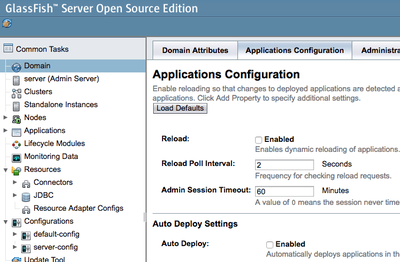
Turn off Auto-Deploy and Dynamic Re-Loading. Both are great for development but affect performance.
JVM Settings
-Xmx2048m
-Xms2048m
-server- Xms/Xmx: With 4GB RAM, assign half (2GB) to the JVM
- Start with all memory allocated to avoid allocation overhead
- -server: Use server VM optimized for peak operating speed
Acceptor Threads
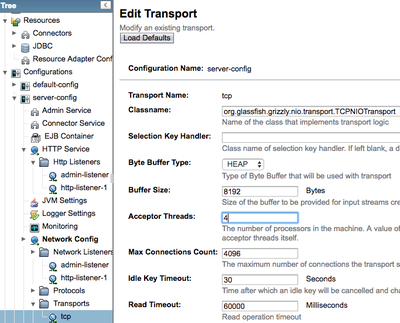
Set equal to CPU cores (4 for quad-core). These threads accept new connections and schedule existing ones.
Thread Pool
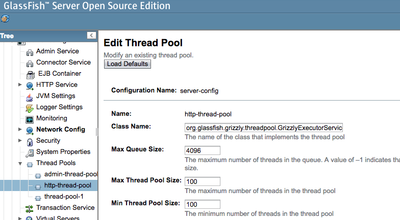
Set both min and max to 100. Using the same value allows GlassFish to use a more optimized thread pool.
Timeouts
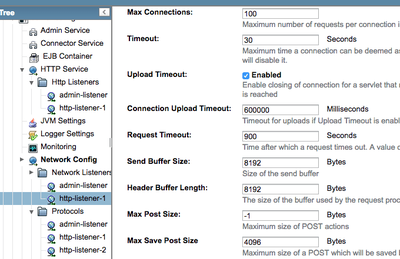
Set to 10 minutes for file upload support:
- http-listener-1 > Connection Upload Timeout: 600000 (milliseconds)
- http-listener-1 > Request Timeout: 600 (seconds)
HTTP Connections
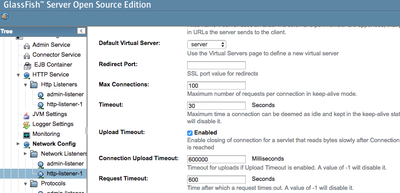
Set http-listener-1 > Max Connections = 200. Connections are divided among threads.
Enable Caching
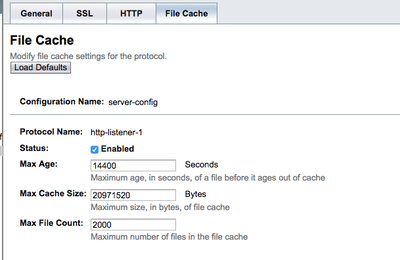
For http-listener-1:
- Status: Enabled
- Max Age: 21600 seconds (6 hours)
- Max Cache Size: 52428800 bytes (50 MB)
- Max File Count: 3000
Disable http-listener-2
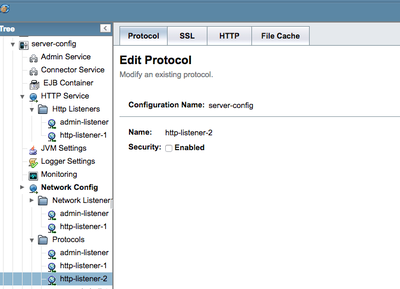
You typically only need one listener, so disable “http-listener-2”.
Logging
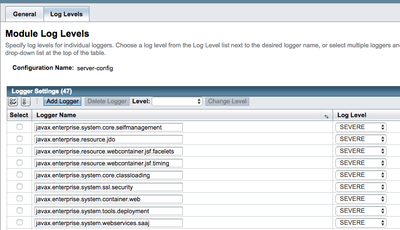
Add the ORDS logger:
oracle.dbtools.level=WARNINGSet all other loggers to SEVERE. INFO is the default which generates many messages.
Conclusion
The above settings are guidelines for a fictitious workload. As with all things performance, you will still need to add load to your system and find the right settings for your hardware, users, and data.
The good news is, you now know which levers to pull!
Jon Dixon, Co-Founder JMJ Cloud