
Since APEX 18.1, there is a much better way to call OAuth2 Client Credentials secured web services. This method eliminates the need for developers to manage OAuth2 credentials and token expiration manually.

Background on OAuth2 Client Credentials
In the OAuth2 client credentials flow you must first call a token web service, passing a client ID and client secret to obtain access tokens for subsequent API calls.
The Traditional Approach (Five Steps)
The conventional method involved:
- Fetching token service URL, Client ID, and Client Secret from a custom table
- Calling the OAuth token service via APEX_WEB_SERVICE
- Optionally storing the token within its expiration window
- Calling the main web service with the token
- Repeating the process for each user call
Drawbacks of the Old Approach
There were three primary concerns:
- Storing and managing credentials securely - Where do you keep the client ID and client secret? In a custom table? How do you protect them?
- Deciding when tokens expire and fetching replacements - Do you cache the token? How do you know when it’s expired? Do you refresh preemptively or wait for a 401 error?
- Performance impact from repeated token service calls - Every API call requires two HTTP requests if you’re not caching tokens.
The Modern Solution (APEX 18.1+)
Two new parameters simplify the process:
p_credential_static_id- References stored Web Credentialsp_token_url- Points to the OAuth token endpoint
APEX now handles token storage, expiration management, and refresh automatically.
Web Credentials Setup
Web Credentials are stored at the Workspace level via:
App Builder > Workspace Utilities > All Workspace Utilities > Web Credentials
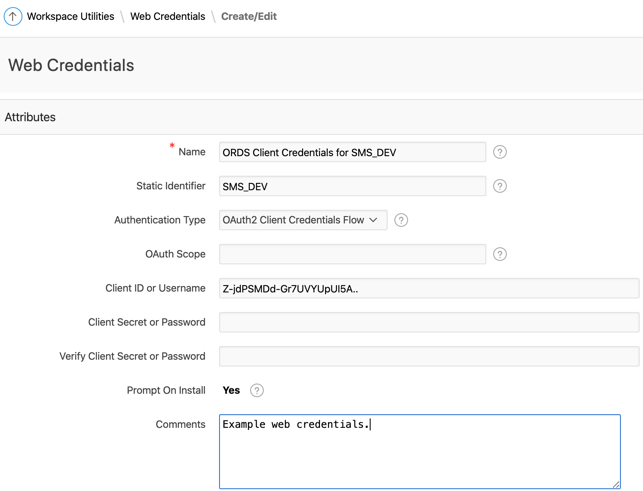
The system securely stores client secrets and prevents even administrators from viewing them. Once saved, the secret is hidden - you can only replace it, not view it.
Code Example
Here’s a PL/SQL example demonstrating the new approach:
DECLARE
  l_rest_url     VARCHAR2(500);
  l_token_url    VARCHAR2(500);
  l_response_clob CLOB;
BEGIN
  -- Create an APEX session (required when running outside of APEX)
  apex_session.create_session(
    p_app_id   => 100,
    p_page_id  => 1,
    p_username => 'ADMIN');

  -- Set REST service and token URLs
  l_rest_url := 'https://api.example.com/v1/data';
  l_token_url := 'https://api.example.com/oauth/token';

  -- Make the REST request with OAuth2 client credentials
  l_response_clob := apex_web_service.make_rest_request(
    p_url                  => l_rest_url,
    p_http_method          => 'GET',
    p_credential_static_id => 'MY_API_CREDENTIALS',
    p_token_url            => l_token_url);

  -- Parse the JSON response
  apex_json.parse(l_response_clob);

  -- Process the response...
  DBMS_OUTPUT.PUT_LINE('Response received: ' || SUBSTR(l_response_clob, 1, 100));
END;
The key parameters are:
- p_credential_static_id: The static ID of your Web Credentials entry (e.g., ‘MY_API_CREDENTIALS’)
- p_token_url: The OAuth token endpoint URL
APEX handles everything else:
- Retrieves the client ID and secret from Web Credentials
- Calls the token endpoint if no valid token exists
- Caches the token for subsequent calls
- Automatically refreshes the token when it expires
Benefits Summary
- Reduces complexity from five steps to two - Just call the API with the credential reference and token URL
- Credentials stored natively in APEX - No custom tables needed
- Enhanced security - Secrets are never exposed, even to administrators
- Automatic token expiration management - No more manual token refresh logic
- Improved performance through token caching - APEX caches tokens and only refreshes when needed
APEX_EXEC Alternative
For use cases where you need to work with REST data sources in a more declarative way, APEX_EXEC provides even more functionality. It takes even more of the load off the developer for compatible use cases. Check out Carsten Czarski’s blog for a great overview of APEX_EXEC capabilities.
Enhancement Request
One improvement I’d like to see: the ability to reference a Remote Server definition plus a token endpoint suffix, rather than requiring an explicit token URL. For example:
l_response_clob := apex_web_service.make_rest_request(
  p_url                  => l_rest_url,
  p_http_method          => 'GET',
  p_credential_static_id => 'MY_API_CREDENTIALS',
  p_remote_server        => 'MY_REMOTE_SERVER',
  p_token_endpoint       => '/oauth/token');  -- Appended to remote server base URL
This would make it easier to manage environments where the base URL changes between development, test, and production.
Conclusion
The addition of p_credential_static_id and p_token_url parameters to APEX_WEB_SERVICE represents a significant improvement in how we integrate with OAuth2-secured APIs. What once required careful management of credentials, tokens, and expiration times is now handled automatically by APEX.
If you’re still using the old approach with custom credential storage and manual token management, I strongly recommend migrating to Web Credentials. The security, simplicity, and reliability benefits are substantial.
Jon Dixon, Co-Founder JMJ Cloud