
Background
One of our primary use cases is embedding APEX applications within iframes alongside Oracle’s ERP Cloud. This gives users a near seamless experience when moving between standard ERP Cloud pages and our custom APEX pages.
APEX relies on session cookies for user authentication. Without the ability to maintain a session cookie, you are forced to make your application public (99% of the time, this is not a good idea).
In May 2019, Google announced upcoming cookie handling changes. By February 2020, Chrome version 80 began rolling out these modifications. See Google’s announcement for more details.
What Will Happen
Applications relying on cookies in iframes with different URLs from the container site will fail. Users will see console warnings indicating cookie rejection due to SameSite policy violations.
Workaround
We contacted the APEX development team and they provided a workaround that works for APEX 18.1 and above.
Navigate to: Application > Shared Components > Authentication Schemes > Create/Edit
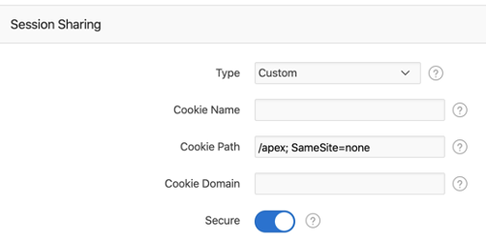
Then make the following changes:
- Change Type to ‘Custom’
- Set Cookie Path to ‘/apex; SameSite=none’ (for /apex URLs) or ‘/ords; SameSite=none’ (for default ORDS)
- Enable ‘Secure’

Note: Some older versions of browsers do not support samesite=none.
Long Term
The development team plans to include the SameSite=none attribute by default in future APEX releases, though no specific version was committed at the time of writing.
Conclusion
Browsers are changing constantly. As full-stack developers, we need to keep an eye on browser developments as well as database changes. Regularly checking your developer tool warnings is a good practice.
Jon Dixon and Matt Paine, Co-Founders of JMJ Cloud