

In our prior post, Oracle ERP Conversions Made Easy with APEX Part 1, we showed how Oracle APEX can streamline data conversion to Oracle EBS.
This blog entry continues that theme, demonstrating how these principles apply to cloud-based ERP conversions.
Part 2 discusses tools available in ERP Cloud and highlights associated challenges.
Part 3 will demonstrate how APEX simplifies conversions, making them faster and repeatable.
Real-world case studies will be shared, including a preview of pre-built conversions in JMJ ERP Cloud Express.
ERP Cloud Conversion Tools
Multiple tools exist for moving data in and out of ERP Cloud databases. Some are spreadsheet-driven for end-users; others are technical tools requiring specialized software.
ADF Data Integrator - ADFDi
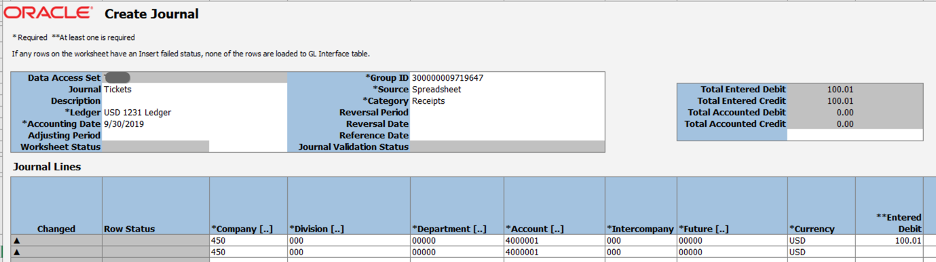
ADFDi spreadsheets resemble GLDi spreadsheets used with Oracle EBS—preconfigured, heavily-coded sheets for data population. Common uses include loading GL journals or AP invoices.

These provide advantages including pre-validation and built-in dropdowns for valid field values. However, they struggle with larger volumes, don’t work on MacOS, can be finicky (undo buttons don’t function), and require refreshing after quarterly upgrades.
They also demand local Excel framework installation—problematic in some corporate environments—and availability is limited to specific business objects. Customer loading isn’t available through ADFDi.
File-Based Data Integrator - FBDi
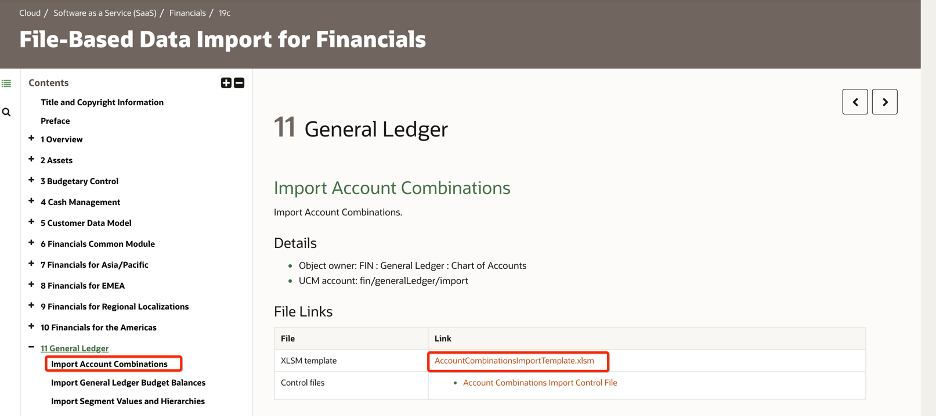
FBDi spreadsheets download from Oracle’s cloud documentation and contain simple worksheets with multiple tabs. Data entry is manual without live validation; column headers provide guidance but can overwhelm users given numerous fields.
Most fields are optional; conditionally required ones create confusion. After data entry, an Excel macro builds a zip file containing CSV data. Direct CSV creation is possible but requires attention to field ordering and consistent filename conventions.
Upload involves running Enterprise Scheduler Service (ESS) jobs:
- Run Load Interface File for Import to stage files into open interface tables via Universal Content Management (UCM) and SQL*Loader
- Optionally run Import processes to validate and import data into destination tables
The second process typically provides output reports listing loaded data and errors. Issues require resolution, potentially returning to source spreadsheets for corrections and resubmission.
End-to-end, this process can be time-consuming. Rigorous Excel work ensures accuracy before loading.
FBDi template documentation: https://docs.oracle.com/en/cloud/saas/financials/20b/oefbf/index.html
FBDi Automation Web Services
FBDi lends itself to automation via Oracle’s SOAP and REST web services. Using ERPIntegrationService, you can:
- Load files to Universal Content Management Server (UCM)
- Submit ESS Jobs (e.g., Load Interface File for Import and Import Journals)
- Check ESS Job Statuses
- Download and verify logs and output reports
Writing full integration flows calling each service sequentially can be cumbersome. Oracle provides a bulk import web service—a single call transfers files and runs required import processes in correct order, with optional email notifications upon completion.
ERPIntegrationService documentation:
- SOAP: https://docs.oracle.com/en/cloud/saas/financials/20b/oeswf/business-object-services.html#erpintegrationservice-d13711e35899
- REST: https://docs.oracle.com/en/cloud/saas/financials/20b/farfa/op-erpintegrations-get.html
Business Object SOAP Web Services
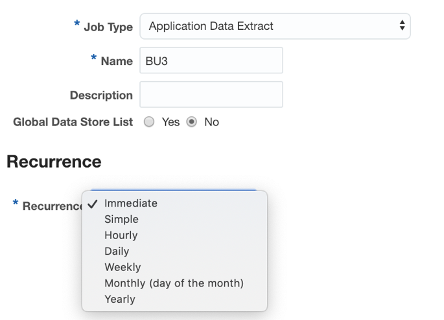
Oracle provides SOAP web services for business objects like Suppliers and Purchase Orders. Documentation varies by release (20B located here: https://docs.oracle.com/en/cloud/saas/financials/20b/oeswf/index.html).
Documentation can be cryptic; determining required versus optional fields or updateability requires experimentation. Using “retrieve” or “get” methods on existing transactions provides guidance for new transactions.
Most SOAP services are older, slowly replaced by REST. The Supplier and Person web services have been deprecated or replaced by REST or HCM Data Loader (HDL).
Some accept single transactions; others allow multiple with per-record errors.
Business Object REST Web Services
REST web service expansion continues with each quarterly release—good news. If both REST and SOAP services exist, choose REST.
Verify REST service completeness before starting; many only allow GET operations currently. Check that required fields are included; early releases sometimes omitted necessary fields.
Business Object REST services documentation: https://docs.oracle.com/en/cloud/saas/financials/20b/farfa/index.html
HCM Data Loader (HDL)
HCM Cloud provides HDL, accessed through Data Exchange usage. It covers various HCM business objects—users, roles, workers, and setup elements like Jobs and Locations.
HDL expects pipe-separated format (PSV) text files. Metadata lines describe data fields; data rows follow.
For complex multi-level entities like Workers, multiple metadata rows combine in single files—Names, Emails, and Assignments alongside Person Numbers.
Date-tracking warrants careful attention; changing start dates can create problems later if workers have complex employment histories with multiple hires/rehires across legal entities with timesheets.
SourceKeys are crucial for post-load record updates.
Tracking issues can be problematic without custom reports; Data Exchange allows drilling through files for error rows but doesn’t excel at summarizing error messages across large files. Error messages can be cryptic, requiring experience to interpret.
BI Publisher
BI Publisher reporting enables custom SQL statements against ERP Cloud databases. During integrations and conversions, verify setup values, report import errors, and confirm successful data import.
Web services are documented here: https://docs.oracle.com/cd/E28280_01/bi.1111/e22259/reportservice.htm#BIPDV824
For smaller files, this works well. Larger datasets risk connection or download timeouts after minutes. Two approaches address this:
- Run SQL in batches via sequential web service calls, aggregating arriving data
- Specify report output delivery to UCM. Once complete, UCM web services download zip files.
UCM web services documentation: “How To Get Files from UCM for Fusion Applications using the GenericSoapPort Web Service (Doc ID 2384418.1)“
BI Cloud Connector (BICC)
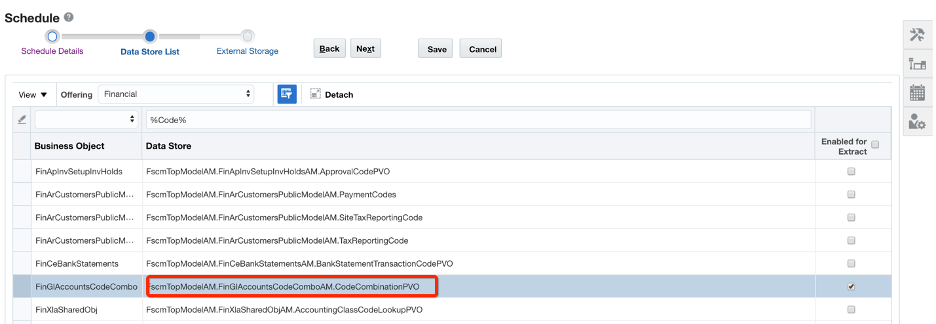
BI Cloud Connector enables Cloud Data Extract scheduling to UCM or Oracle Cloud Storage.
These extracts export data for various Business Objects. Resulting files access via UCM web services or Oracle Cloud Storage links.
Completion notifications are available. UCM zip files contain CSV data plus Manifest and JSON files.
Documentation for 19A: https://docs.oracle.com/en/cloud/saas/applications-common/19a/biacc/overview-to-extracting-data-from-fa-cloud-sources.html#overview-to-extracting-data-from-fa-cloud-sources
Cloud Conversion Challenges
Using ERP Cloud tools for data conversions without automation creates problems:
-
Manual Excel manipulation is slow and error-prone. Users make mistakes—trailing spaces, inconsistent date formats, blank mandatory fields. Formulas become out-of-sync; Excel lookups fail. Opening and closing CSV files corrupts date and number formats.
-
Excel security is problematic. Passwords crack easily online; files often sit unencrypted locally. Data security requires treating sensitive information (PII) cautiously.
-
Local Excel files hinder collaboration. SharePoint/Box/Dropbox alternatives often go unused; spreadsheets fly via email instead.
-
How quickly and reliably map and default extra fields? VLOOKUP or INDEX/MATCH work but don’t guarantee value accuracy or complete lookups.
-
How verify data accuracy and completeness before loading? How confirm it remains correct in different environments with different setup values?
-
How check full data import once sent to Oracle? How provide reconciliation reports comparing sent data versus what entered ERP Cloud?
-
Without middleware, how automate web service calls?
-
Why does conversion execution take long? Why so many processes? How reduce cycle time and user error potential?
To Be Continued
Part 2 reviewed available ERP Cloud data loading tools and discussed challenges.
Part 3 will demonstrate how APEX vastly simplifies migration processes and share real-world case studies showing achievable results.
This includes previewing pre-built conversions in JMJ ERP Cloud Express.
Matt Paine, Co-Founder JMJ Cloud