

With the evolution of ERP Cloud and Oracle Cloud Infrastructure (OCI), we are starting to see ERP Cloud utilize OCI features. This is a positive move and it will allow ERP Cloud customers to gain more value from their ERP Cloud investment. One area where we have seen this partnership blossom is with ERP Cloud BI Cloud Connector (BICC) and OCI Object Storage. In this post I will cover how you can leverage more from this integration using OCI Events and Notifications.
Background
Oracle BI Cloud Connector (BICC) provides a robust mechanism for performing bulk exports of data from ERP Cloud. Exported CSV files can be directed to Universal Content Management (UCM) (contained within the ERP Cloud environment), or to an OCI Object Storage Bucket. BICC exports are scheduled through the ERP Cloud Enterprise Scheduler Service (ESS). For those of you familiar with e-Business Suite, this is like the Concurrent Manager. So, how do we know when a scheduled job has finished so we can go fetch the file? This is the problem we will address in this post.
Although the example below describes a scenario using ERP Cloud, this pattern can be re-used for any scenario where you need to perform an action when a file is created in an OCI bucket, but you don’t know when the file will be created.
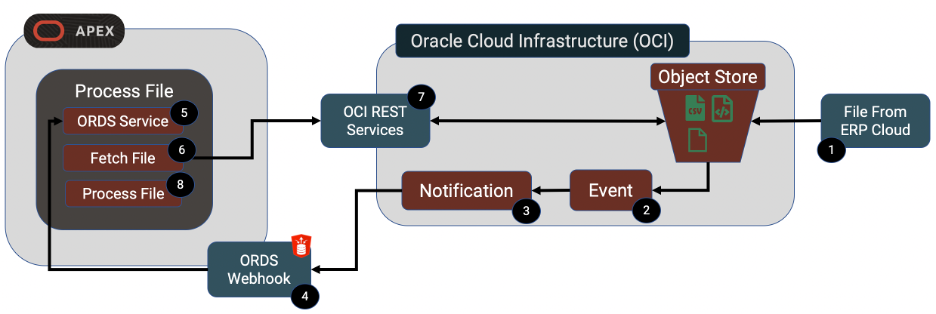
OCI Events and Notifications
Oracle Cloud Infrastructure includes two integration tools that can help us with this problem. These are Events and Notifications.
Events Service
Events fire when certain things happen on your OCI infrastructure. In our case we want to launch an event whenever a file is created in a specific OCI Object Storage bucket. An event on its own, however, is not very useful. We need the Event to do something and this is where Notifications come in.
Notifications Service
A Notification can perform one of the following operations:
- Function (Cloud Based Function e.g. Java)
- HTTPS (Custom URL)
- PagerDuty
- Slack
The key notification for us is ‘HTTPS (Custom URL)’. This notification type is further described in section 3 below. When this type of Notification fires, it posts a JSON payload to the HTTPS Endpoint that you define. The content of the payload is specific to the OCI service that causes the Event to fire. In our case, it will contain information about the file that was created.
End to End Process
Now that we have a background on Events and Notifications, we will deep dive into the example process from end-to-end.
1 - File from ERP Cloud
In our example this file is coming from BI Cloud Connector (BICC) on ERP Cloud. As I mentioned earlier, BICC allows you to perform high volume extracts of data from ERP Cloud to either local Universal Content Manager (UCM) or an OCI Object Store Bucket. We will be using OCI Object store as this gives us more options and easier access to the files once created. BICC allows you to either call a web service to launch an extract job or to use ERP Cloud to schedule the extract. In view of this, files could appear in our OCI Object Store Bucket at any time. We need to know when the file is created so we can go and fetch it.
Object Store Bucket
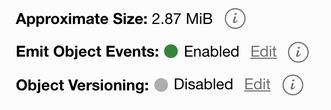
You will need to create an Object Store bucket to receive your file. When creating your Object Store bucket, be sure the ‘Emit Object Events’ option is checked. This is what allows us to subscribe to events on the bucket.
2 - Event
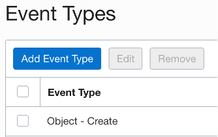
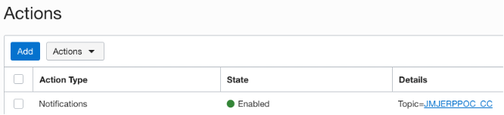
As soon as the file is created in our object store bucket, the event fires. Events consist of an Event Type (this describes the action that should trigger the event) and an Event Action (what you want to happen when the event occurs). In our case the event type is ‘Object - Create’ and the Event Action is to call a Notification.
3 - Notification
The Notification is the operation we want to perform when our event fires. We are using the ‘HTTPS (Custom URL)’ operation. Notifications consist of Topics which allow us to categorize our notifications. For each Topic, we can create multiple Subscriptions. This allows us to let multiple systems know when an Event occurs. In this example, we are referencing our ORDS Endpoint.
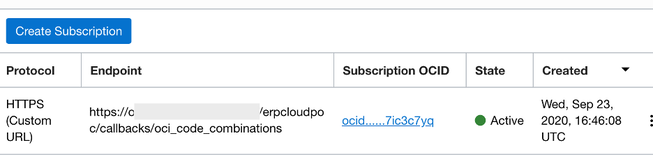
If your ORDS end point is unavailable when it is called by the Notification, OCI will re-try to post to your service for a period of up to 2 hours.
The Endpoint service needs to have a POST handler to accept the payload from the Notification. In our case, our Endpoint is an ORDS REST service running on an APEX environment (see step 4 for details).
When you first create a notification, it will go into a status of ‘Pending confirmation’.
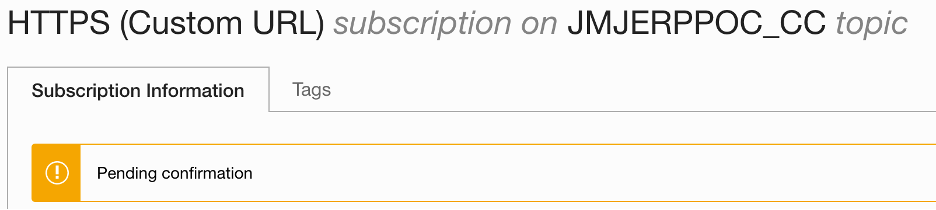
At the time you create the Notification, OCI sends a payload to your Endpoint containing a confirmation URL. The confirmation step ensures that you have control over the Endpoint that you define in your Notification.
Grab the URL and open it on your browser. One you have done this; your Notification is ready to go. Going forward, whenever a file is uploaded to your Object Storage bucket, OCI will post a JSON file to your Endpoint. For object store events, the payload looks like this:
{
  "eventType": "com.oraclecloud.objectstorage.createobject",
  "cloudEventsVersion": "0.1",
  "eventTypeVersion": "2.0",
  "source": "ObjectStorage",
  "eventTime": "2020-09-27T17:02:30Z",
  "contentType": "application/json",
  "data": {
    "compartmentId": "ocid1.compartment.oc1..xxxxxxxx",
    "compartmentName": "JMJ",
    "resourceName": "test_file.csv",
    "resourceId": "/n/jmjcloud/b/jmj-inbound/o/test_file.csv",
    "availabilityDomain": "PHX-AD-1",
    "additionalDetails": {
      "bucketName": "jmj-inbound",
      "archivalState": "Available",
      "namespace": "jmjcloud",
      "bucketId": "ocid1.bucket.oc1.phx.xxxxxxxx",
      "eTag": "xxxxxxxx-xxxx-xxxx-xxxx-xxxxxxxxxxxx"
    }
  },
  "eventID": "xxxxxxxx-xxxx-xxxx-xxxx-xxxxxxxxxxxx",
  "extensions": {
    "compartmentId": "ocid1.compartment.oc1..xxxxxxxx"
  }
}
4 – ORDS Service
The ORDS web service definition is pretty simple. Here is a screen shot (from SQLDeveloper) of the Module, Template and Handler for a service that can receive a payload from an OCI Notification.
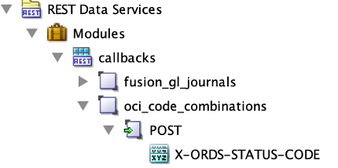
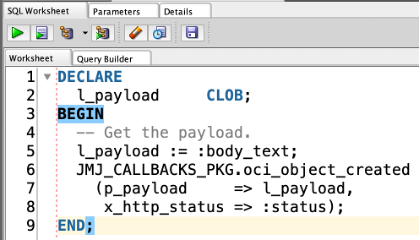
The PL/SQL code you add to the handler can do anything you want. In our case it submits a Database Scheduler Job to fetch and process the file asynchronously.
5 – Process File
In our DB Scheduler Job, we use the OCI Object Store REST services to fetch the file from the OCI Object Store bucket. This connectivity between APEX and OCI was made much easier in APEX 19.2 when Web Credentials were enhanced to include the ‘Oracle Cloud Infrastructure (OCI)’ Authentication Type. This allows us to configure a native Web Credential for connecting to OCI Web Services. I recommend this Oracle A-Team Blog which describes in detail the OCI and APEX setups that are required to get this integration working.
After you have fetched the file (using APEX_WEB_SERVICE), you can then parse it (using APEX_DATA_PARSER) and process it as necessary, making the data available for your APEX Applications.
Conclusion
I have been using APEX and ORDS on Amazon Web Services (AWS) for a number of years and until recently, I was not sure Oracle was ever going to compete. Oracle Cloud Infrastructure has come a long way in the past 12 months. While it still falls far short of AWS in terms of functionality, the functionality that is there is intuitive and works well. If you add great initiatives like ‘Always Free’ ATP, ORDS and APEX then you have a platform that is worth getting to know.
As APEX/ORDS developers and architects I encourage you to explore OCI. I also think we should start to think differently about how we build our APEX solutions to utilize OCI where it makes sense.
Jon Dixon, Co-Founder JMJ Cloud