
This post addresses challenges customers face when extending Oracle Fusion Apps UI. While OTBI offers dashboard and chart options, it cannot incorporate mashups with external systems. The proposed solution uses Oracle’s PaaS offerings, specifically APEX on Oracle Exadata Express Service, Oracle Database Schema Cloud Service, or self-hosted APEX environments.
Introduction
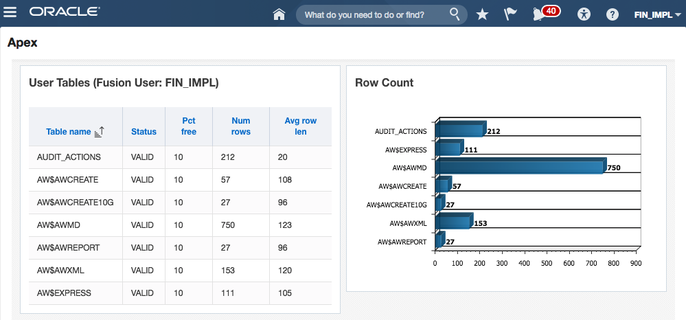
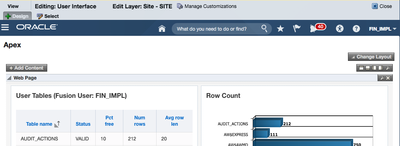
We demonstrate integrating a simple APEX Report into a Cloud ERP page. Potential applications include:
- APEX reports displaying Salesforce data via web services
- APEX data entry forms posting to external systems
- Mashups combining APEX database data with Cloud ERP information
This example prioritizes demonstration over production-readiness, acknowledging areas needing enhanced security.
Preparing APEX
Theme Selection
Use the Vista theme (Alta UI) to match Cloud ERP aesthetics. This provides visual consistency between your APEX pages and the Cloud ERP interface.
Custom Page Template
Create a custom page template removing APEX headers and navigation. The embedded page should appear seamless within Cloud ERP:
Security Settings
Enable frame embedding in security settings to allow Cloud ERP to embed your APEX pages in an iframe.
SSL Certificates
Import Oracle Cloud ERP SSL certificates into the database wallet for secure communication.
Creating a Demo APEX Page
Create page 10 with the following components:
- Authentication: Public (we’ll validate JWT in the page process)
- Page Process: “Parse JWT and Get Username”
- Regions: Classic Report and chart regions
- Page Items:
- P10_JWT (hidden)
- P10_JWT_BASE (hidden, restricted)
- P10_FUSION_USER (display only)
Understanding JWT
A JWT is essentially a token that is generated by Cloud ERP uniquely for your session. The token contains three Base64-encoded segments: header, payload, and HMAC256 signature.
The payload includes expiration and username information:
{
  "exp": 1478831500,
  "iss": "www.oracle.com",
  "prn": "FIN_IMPL",
  "iat": 1478817100
}
The Page Process
Extract JWT from Query String
l_query_string := owa_util.get_cgi_env('QUERY_STRING');
l_jwt_start_pos := INSTR(l_query_string, 'jwt=') + 4;
:P10_JWT_BASE := SUBSTR(l_query_string, l_jwt_start_pos, 10000);
Parse JWT Payload
l_jwt_arr := APEX_UTIL.STRING_TO_TABLE(:P10_JWT_BASE, '.');
l_prn_json := UTL_ENCODE.TEXT_DECODE(
  l_jwt_arr(2),
  'UTF8',
  UTL_ENCODE.BASE64
);
APEX_JSON.PARSE(l_prn_json);
:P10_FUSION_USER := APEX_JSON.get_varchar2(p_path => 'prn');
Authenticate JWT via Cloud ERP REST
l_url := 'https://<<host>>/hcmCoreApi/resources/latest/emps/1';

apex_web_service.g_request_headers(1).name := 'Authorization';
apex_web_service.g_request_headers(1).value := 'Bearer ' || :P10_JWT_BASE;
apex_web_service.g_request_headers(2).name := 'Content-Type';
apex_web_service.g_request_headers(2).value := 'application/vnd.oracle.adf.resourceitem+json';

l_clob := apex_web_service.make_rest_request(
  p_url         => l_url,
  p_http_method => 'GET'
);

l_http_status_code := apex_web_service.g_status_code;
Cloud ERP Configuration
Step 1: Create Third Party Application
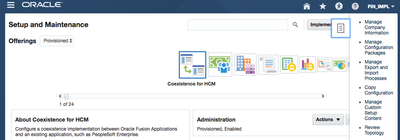
Navigate to: Setup & Maintenance > Manage Custom Setup Content > Manage Third Party Applications
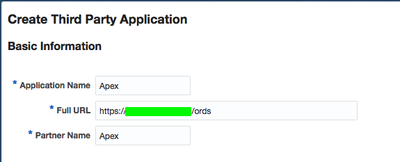
Enter the APEX base URL (e.g., https://www.example.com/ords)
Step 2: Create Page Integration
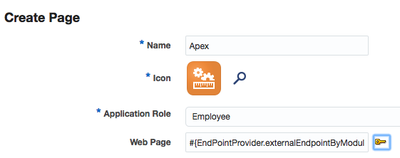
Navigate to: Navigator > Tools > Page Integration
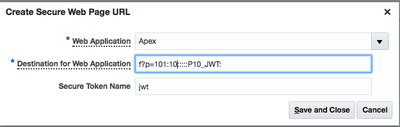
Configure:
- Select third-party application
- Destination:
f?p=101:10:::::P10_JWT: - Secure Token Name: jwt
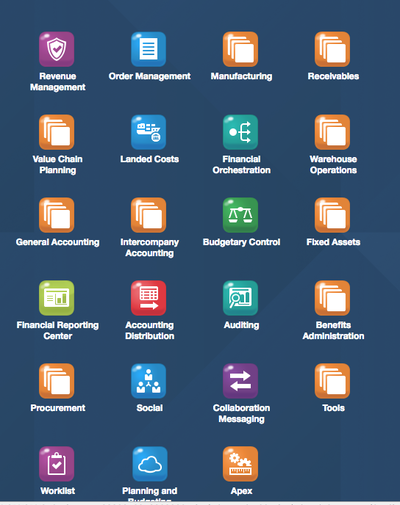
Step 3: Locate Icon in Application Structure
Navigate to: Navigator > Tools > Structure
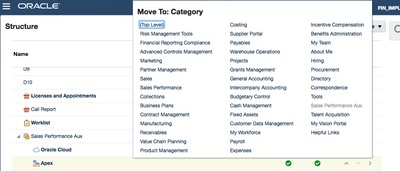
Find and expand ‘Sales Performance Aux’ and set to Top Level placement.
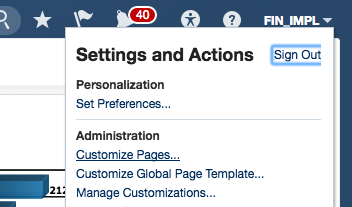
Step 4: Adjust Page Size
Users can customize dimensions via: Your User Name > Customize Pages
Conclusion
The above steps may seem complex at first glance. But when you consider we just integrated a highly sophisticated web based PaaS service (APEX) with Oracle Fusion Apps / Cloud ERP, it’s pretty amazing.
APEX’s ability to consume SOAP/REST services combined with Exadata Express pricing starting at $175/month positions APEX as an underrated option for cloud integration scenarios.
Jon Dixon, Co-Founder JMJ Cloud