
This post explores using Oracle APEX to modernize Oracle e-Business Suite (EBS) interfaces without significant additional costs. I’ve been working with EBS since version 9.4, and I’ve seen how APEX can bring modern user experiences to aging ERP systems.
The Case for Modernizing EBS
Companies running on-premise EBS cannot always migrate to cloud ERP solutions. Common reasons include:
- Missing features in cloud ERP for specific industries
- Significant customizations that would require rework
- Integration complexity with other on-premise systems
- Budget constraints for full migration
- Risk tolerance - “if it ain’t broke, don’t fix it”
However, users expect modern interfaces. After experiencing contemporary applications in their personal lives, they struggle with EBS’s dated user experience. APEX provides a path to modernization without replacing the entire system.
Oracle APEX Overview
APEX is a no-cost option included with your Oracle Database license. It provides tools for building scalable, secure web applications with minimal code.
Requirements for running APEX alongside EBS:
- Application server/VM: Tomcat and ORDS (25GB disk, 4GB memory, 1 CPU)
- APEX installation: Latest version installed on the EBS database
- ORDS: Oracle REST Data Services for serving APEX pages
The infrastructure requirements are modest compared to the benefits gained.
Architecture Overview
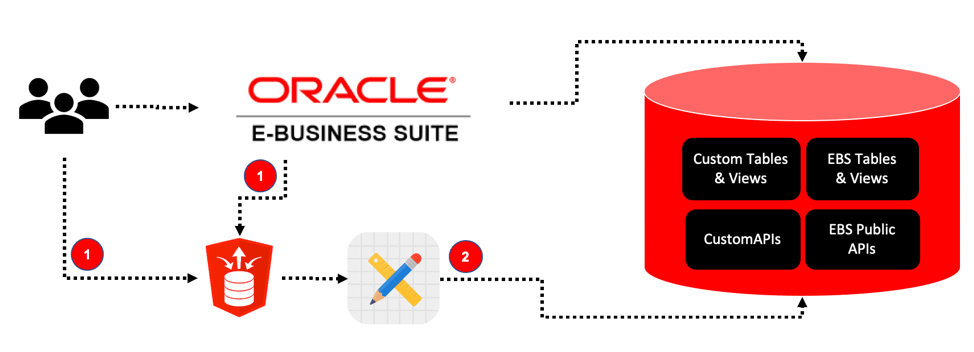
Users can access APEX applications through:
- EBS menus: APEX pages launched from within EBS forms
- Direct login: Standalone access using EBS credentials
- Mobile devices: Responsive design for field access
Because APEX runs on the same database as EBS, you get zero-latency data access. No middleware, no synchronization, no data duplication.
Beyond APEX
Once you have APEX infrastructure in place, you can extend EBS capabilities further:
- Voice interfaces: Alexa skills powered by ORDS
- SMS notifications: Integration with Twilio
- Cloud PaaS products: Extend with Oracle Cloud services
- AWS S3: Document storage and retrieval
- Mobile interfaces: Native iOS/Android apps via ORDS APIs
Use Cases
Use Case 1 – High Impact Performance Management
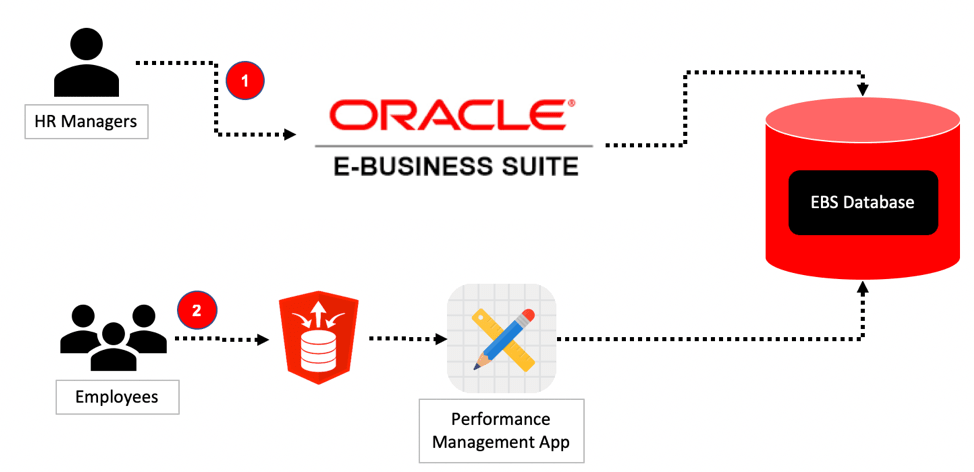
JMJ developed an APEX application replacing the employee-facing EBS performance management module. The original EBS screens were complex and intimidating for employees who only used them once or twice a year.
The APEX replacement:
- Simplified the user interface
- Guided employees through the process
- Used standard Oracle APIs for data updates
- Maintained all existing EBS functionality behind the scenes
Use Case 2 – Material Processing at 40 Manufacturing Plants
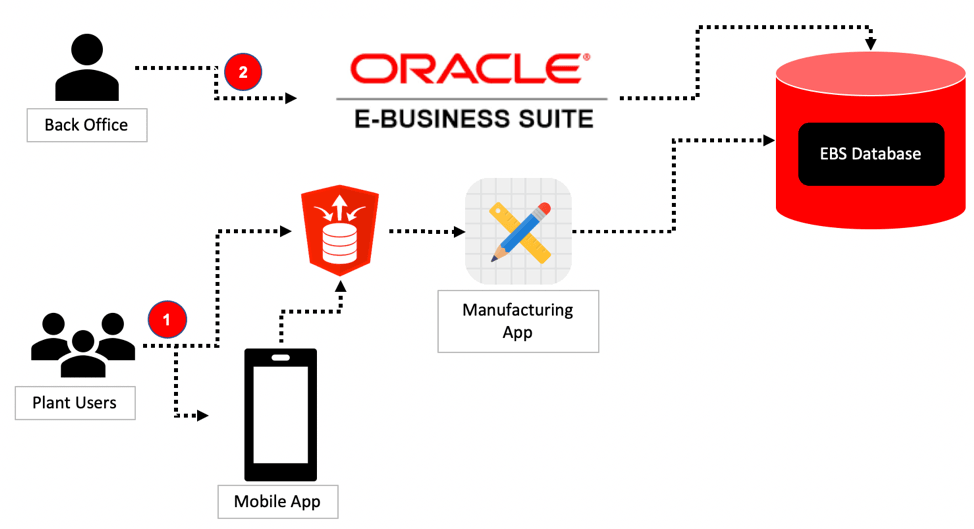
An APEX application with native iOS integration simplified plant operations. Workers on the manufacturing floor needed quick access to inventory and processing information.
The solution:
- APEX-based web application for desktop users
- iOS app for floor workers with barcode scanning
- ORDS APIs serving both interfaces
- EBS backend handling sales orders and invoicing
One codebase, multiple interfaces, all integrated with EBS.
Use Case 3 – Capital Expenses Tracking
A focused APEX application handling capital expense tracking and approvals:
- 8 pages, 4 tables
- Integration with EBS authentication
- Use of EBS views and value sets
- Oracle Workflow for approvals
- Projects module integration for cost tracking
This demonstrates that APEX modernization doesn’t require massive scope. Start small, prove value, expand.
Conclusion
APEX modernizes EBS user experiences while preserving existing functionality. You’re not replacing EBS - you’re providing modern windows into it.
Benefits:
- Low cost: No additional Oracle licensing
- Low risk: EBS continues to run as-is
- High impact: Users get the interface they expect
- Incremental: Modernize one process at a time
For organizations not ready for cloud ERP migration, APEX provides a pragmatic path to modernization. It buys time while delivering immediate user experience improvements.
Jon Dixon, Co-Founder JMJ Cloud