
In this post I will discuss implementing Oracle REST Data Services (ORDS) for native iOS mobile applications accessing Oracle E-Business Suite data.

When Should I Go Native?
Before committing to native mobile development, I always advocate starting with responsive web apps using Oracle APEX. APEX applications built with the Universal Theme are responsive by design and can provide an excellent mobile experience without the overhead of native app development.
However, native apps become necessary in certain situations:
- Offline capabilities: When users need to work without network connectivity
- Hardware device control: Camera integration, sensors, GPS with high precision
- Performance requirements: Complex graphics or computationally intensive operations
- App store presence: When business requirements mandate presence in Apple App Store or Google Play
Architecture
The system uses a three-layer security model for mobile applications accessing Oracle data:
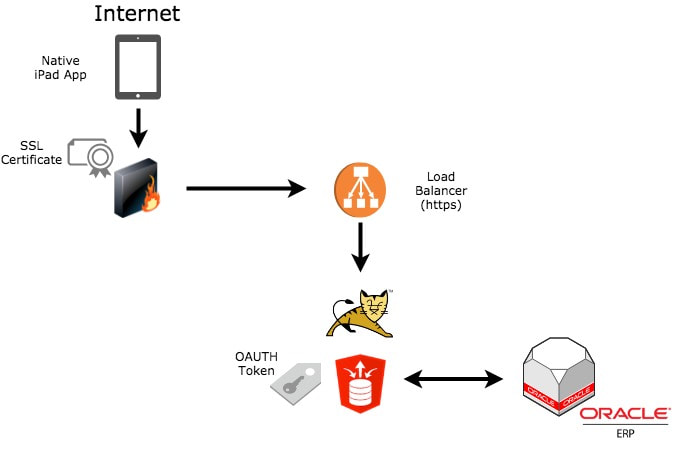
- Mobile devices request OAuth tokens from ORDS
- SSL certificates authenticate through the firewall
- Valid tokens are included in subsequent service calls
Security Approach
A comprehensive security strategy includes multiple layers:
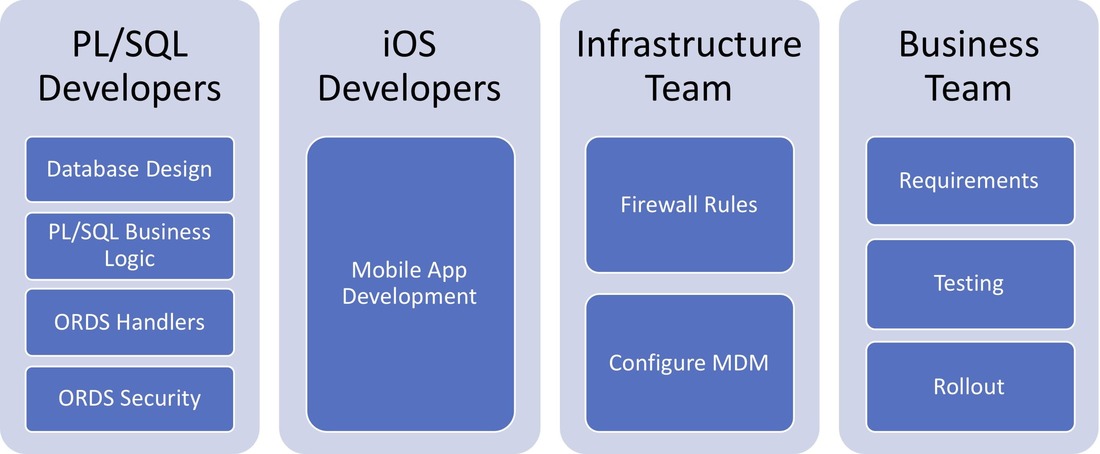
- Mobile Device Management (MDM): Enforces device policies and can remotely wipe corporate data
- SSL certificates: Provides firewall authentication for device identification
- OAuth2 Client Credentials Flow: Token-based authentication for API access
- ORDS privileges: Fine-grained access control restricting service availability
Working with ORDS and iOS
When building native iOS applications that consume ORDS services, consider the following:
Composite Services
Create composite services that combine multiple data sources into single API calls. This reduces network traffic and improves mobile app performance. Instead of making five separate calls for related data, build one ORDS service that returns all the data you need.
Multi-Language Support
Support multiple languages by having translated data services or including language parameters in your API calls. Consider storing translations in the database and letting ORDS return the appropriate language based on user preferences.
Environment Management
Plan for the full app lifecycle across development, test, and production environments. Use configuration to switch between ORDS endpoints rather than hardcoding URLs.
Offline Sync
Implement robust offline synchronization with version number conflict resolution. When a mobile user makes changes offline, your sync logic needs to handle conflicts when multiple users modify the same record.
Key considerations for offline sync:
- Use version numbers or timestamps to detect conflicts
- Decide on conflict resolution strategy (last write wins, user chooses, etc.)
- Queue offline changes and process in order when connectivity returns
- Provide clear feedback to users about sync status
Monitoring
Effective monitoring is crucial for mobile applications:
- Crashlytics: Use tools like Firebase Crashlytics for mobile logging and crash reporting
- Custom ORDS logging: Log API calls to database tables for troubleshooting
- Performance metrics: Track response times and error rates
Building custom logging into your ORDS handlers allows you to track:
- Who called the service
- When it was called
- What parameters were passed
- How long the call took
- Whether it succeeded or failed
This data is invaluable for troubleshooting production issues and understanding usage patterns.
Conclusion
ORDS provides an excellent foundation for building native mobile applications that access Oracle database data. By implementing proper security layers, designing efficient composite services, and planning for offline scenarios, you can deliver robust mobile experiences while leveraging your existing Oracle investment.
Jon Dixon, Co-Founder JMJ Cloud