
REST enabled SQL was first introduced in ORDS 17.4. It is an important feature in the continued evolution of ORDS as a product. REST enabled SQL fits very well into Oracle’s Cloud mantra, in that it enables functionality much akin to a database link but without incurring the resource overhead and the security shortfalls of database links. It essentially provides developers to run Queries, DML, DDL and PL/SQL statements against an Oracle database via a REST interface.
GraphQL is a relatively new open-source technology, introduced by Facebook. GraphQL is a data query and manipulation language for APIs, and a runtime for fulfilling queries with existing data.
While the relationship between GraphQL and REST enabled SQL may not be immediately obvious, I believe there are many similarities and plan to describe them in this post.
What is GraphQL?
From Wikipedia: “GraphQL is an open-source data query and manipulation language for APIs, and a runtime for fulfilling queries with existing data. GraphQL was developed internally by Facebook in 2012 before being publicly released in 2015. On 7 November 2018, the GraphQL project was moved from Facebook to the newly-established GraphQL foundation, hosted by the non-profit Linux Foundation”.
Essentially, GraphQL allows a front-end developer to generate a dynamic data query without needing to know the underlying database technology. Much like REST services therefore, GraphQL abstracts the developer from the underlying database. Because of its dynamic nature, however, GraphQL removes the need to build a REST end-point to cover every resource and data element. Instead, you build one back end end-point to handle all requests. You then dynamically build your query on the front end (using a special JSON format) and submit your query to the server for execution. This avoids the overhead of calling multiple REST resources and then consolidating the responses.
GraphQL is not a database, it is a query language that allows you to inquire on data. It requires a backend (think middleware server) that handles the query and dispatches the query to the appropriate database(s) to get the actual data. These databases could be MySQL, Oracle, Postgress etc. An example of a GraphQL API server is an open source product called Prisma.
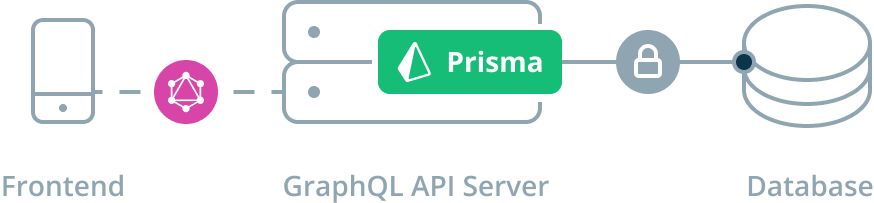
GraphQL allows the client to decide exactly what data it wants. If you are just looking for the customer name and number, you can limit your GraphQL query to just those fields. Most REST services would force you to retrieve all attributes of a customer this bloating the payload.
GraphQL is strongly typed and each type describes a set of available fields. This not only facilitates descriptive error messages but also allows you to inquire on the types that are supported by the database.
So, what does a GraphQL query look like?
GraphQL Query:
{
 Customer (id: "100") {
 name
 number
 }
}
Response:
{
 "data": {
 "customer": {
 "name": "ABC Corp",
 "number": 22202
 }
 }
}
You can see that the query itself defines the shape of the data that should be returned.
This all sounds great but the GraphQL server does not come for free. It obviously needs to understand everything about the underlying databases. Forgetting the infrastructure requirements, the work of mapping all of that data can be a big hurdle.
So how can Oracle RAD stack developers achieve some of the benefits of GraphQL using the software they already own? ORDS and REST enabled SQL to the rescue.
What is REST Enabled SQL?
REST enabled SQL allows a client to send any SQL statement to an Oracle database and have the database execute that statement. These statements can include:
- SELECT, UPDATE, DELETE
- PL/SQL Blocks
- SQL*Plus and SQLCL Commands
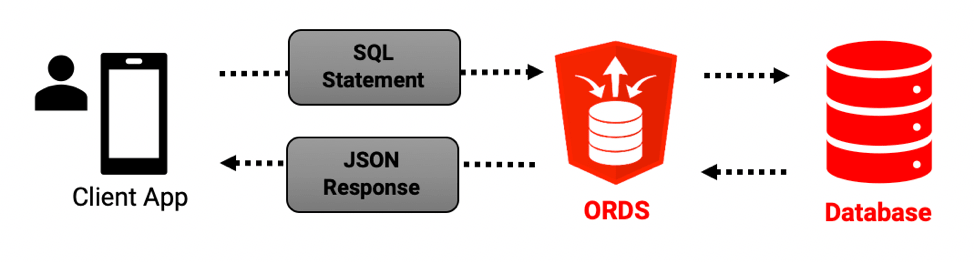
Attributes of REST Enabled SQL that are similar to GraphQL include:
- The client can inquire on what tables and views are available in the database by inquiring on the data dictionary.
- The client can inquire on the structure of specific tables and views and receive detailed information on each column (i.e. columnName, jsonColumnName, type, precision, scale and isNullable)
- The client can request exactly what data it wants by defining it in the SQL statement.
- REST enabled SQL uses a single end-point “https://
/ords/ /_/sql” for all inquiries (not multiple separate REST services). - Because it is using the Oracle database, the data is strongly typed.
- You can join multiple tables (an or use views) to consolidate data into one request that would otherwise have required you to call multiple REST resources and then merge the data together.
An interesting point to note here is that much like with GraphQL, a ‘smart’ client can navigate an inquire on a database with no pre-programmed knowledge of the structure of the database.
Other attributes of REST Enabled SQL:
- Queries can be expressed as a simple select statement ‘SELECT SYSDATE FROM DUAL’ or by passing a structured JSON document.
- REST enabled SQL can be secured by:
- Schema Authentication (the database schema user name and password).
- OAuth 2 Client Credentials (client gets a token and then uses that token for subsequent calls)
- First Party Authentication (Basic Authentication). Utilize a user and password created in Oracle REST Data Services with the SQL Developer role.
Probably the biggest mismatch between GraphQL and REST Enabled SQL is that REST enabled SQL assumes the client/developer knows the Oracle database. While this may sound like heresy to the open source world, in the RAD stack world this is not a bad thing. In fact, embracing the power of the Oracle database is something every RAD stack developer should be looking to do.
Configuring REST Enabled SQL
To enable REST enabled SQL for your instance, you need to add the following entry to the ORDS parameter file on your server (typically defaults.xml):
<entry key="restEnabledSql.active">true</entry>In order to use REST enabled SQL for a specific schema, you also need to REST enable the schema, just like you would to allow creation of any ORDS services in a schema.
- Connect to the Schema
- Run the command:
exec ords.enable_schema;
Important Note: As mentioned in the documentation “Enabling the REST- Enabled SQL service enables authentication against the Oracle REST Data Service enabled database schemas. This makes the database schemas accessible over HTTPS, using the database password. Oracle highly recommends that you provide strong secure database passwords”.
Securing REST Enabled SQL
In view of this warning described above, I advise that you create an entirely separate schema for use with REST enabled SQL (and make the schema password very complex). This at least limits your exposure to that one schema. Added to that, you should also avoid using Schema Authentication (i.e. use schema name and password) whenever possible and instead use OAUTH2 Client Credentials Authentication.
If a third party needs to access your database using REST enabled SQL, setup OAUTH2 Client Credentials Authentication by performing the following steps:
- Create a new schema e.g. SYSTEMX
- Login as SYSTEMX and run ords.enable_schema to enable ORDS in the schema
- Create the appropriate grants to the schema SYSTEMX for the tables and views you want to provide access to.
- Create an OAUTH client and assign the role ‘SQL Developer’
- Provide the client with the client_id and client_secret values from the table ORDS_METADATA.OAUTH_CLIENTS.
- The client would then use the client id and secret to get a token and use that and would never know the schema password.
Script:
BEGIN
 -- ORDS Enable the Schema
 ords.enable_schema;

 -- Create OAUTH Client.
 oauth.create_client(
 p_name => 'TESTRESQL',
 p_description => 'TESTRESQL',
 p_grant_type => 'client_credentials',
 p_support_email => 'jon.dixon@jmjcloud.com',
 p_privilege_names => NULL);

 -- Grant SQL Developer role to the client.
 oauth.grant_client_role('TESTRESQL', 'SQL Developer');
 COMMIT;
END;
Unfortunately, even when you configure OAUTH2 Client Credentials Authentication you can still use Schema Authentication. I would like to see a way of turning Schema Authentication off for a schema that has OAUTH2 Client Credentials Authentication.
A REST Enabled SQL Example
In this example, I am going to be using the ‘application/sql’ Content-Type. This indicates to ORDS that it should expect a SQL statement in the payload. You can also use ‘application/json’ and pass a structured JSON document. You may notice that I am using OAUTH2 Client Credentials security and passing a token with each call.
I have created a table called atx_ev_charging_stations which contains a list of the electric vehicle charging stations in Austin. The first think I need to do is get a definition of the table. REST enabled SQL will always return a metadata array in the response, this describes the columns in the SELECT statement. All I need to do is pass a SQL statement that I know will return no rows and I can get the metadata e.g. ‘select * from atx_ev_charging_stations where 1=2’
CURL Command:
curl -X POST \
 https://example.com/ords/rest/_/sql \
 -H 'Authorization: Bearer TgZogKUFTHEz9jjehoQTwg..' \
 -H 'Content-Type: application/sql' \
 -H 'cache-control: no-cache' \
 -d 'select * from atx_ev_charging_stations where 1=2'
Result set (truncated for brevity):
{
 "env": {
 "defaultTimeZone": "America/Chicago"
 },
 "items": [
 {
 "statementId": 1,
 "statementType": "query",
 "statementPos": {
 "startLine": 1,
 "endLine": 2
 },
 "statementText": "select * from atx_ev_charging_stations where 1=2",
 "resultSet": {
 "metadata": [
 {
 "columnName": "ID",
 "jsonColumnName": "id",
 "columnTypeName": "NUMBER",
 "precision": 0,
 "scale": -127,
 "isNullable": 0
 },
Notice I am only asking for two columns from the table. An equivalent REST resource would need to contain all of the columns in order to fulfill the requirements of all inquiries on this resource:
SQL Statement:
SELECT station_display_name
, address_1
FROM atx_ev_charging_stations
WHERE postal_code = 78704
AND customer_subcategory = 'Apartment'
CURL Command:
curl -X POST \
 https://example.com/ords/rest/_/sql \
 -H 'Authorization: Bearer TgZogKUFTHEz9jjehoQTwg..' \
 -H 'Content-Type: application/sql' \
 -H 'cache-control: no-cache' \
 -d 'SELECT station_display_name
, address_1
FROM atx_ev_charging_stations
WHERE postal_code = 78704
AND customer_subcategory = '\''Apartment'\'''
Result Set:
{
 "env": {
 "defaultTimeZone": "America/Chicago"
 },
 "items": [
 {
 "statementId": 1,
 "statementType": "query",
 "statementPos": {
 "startLine": 1,
 "endLine": 6
 },
 "statementText": "SELECT station_display_name\n, address_1\nFROM atx_ev_charging_stations\nWHERE postal_code = 78704\nAND customer_subcategory = 'Apartment'",
 "resultSet": {
 "metadata": [
 {
 "columnName": "STATION_DISPLAY_NAME",
 "jsonColumnName": "station_display_name",
 "columnTypeName": "VARCHAR2",
 "precision": 255,
 "scale": 0,
 "isNullable": 1
 },
 {
 "columnName": "ADDRESS_1",
 "jsonColumnName": "address_1",
 "columnTypeName": "VARCHAR2",
 "precision": 255,
 "scale": 0,
 "isNullable": 1
 }
 ],
 "items": [
 {
 "station_display_name": "CATHERINE / CATHERINE 1",
 "address_1": "300 Barton Springs Rd"
 },
 {
 "station_display_name": "CATHERINE / CATHERINE 2",
 "address_1": "300 Barton Springs Rd"
 },
 {
 "station_display_name": "ROSCOE PROPERTI / TIMBERCREEK 1",
 "address_1": "614 S 1st St"
 },
 {
 "station_display_name": "THE GROVE / MAIN STATION 1",
 "address_1": "3707 Manchaca Rd"
 },
 {
 "station_display_name": "THE MEDVE GROUP / BARTON HILLS",
 "address_1": "1244-1298 Barton Hills Dr"
 }
 ],
 "hasMore": false,
 "limit": 10000,
 "offset": 0,
 "count": 5
 },
 "response": [],
 "result": 0
 }
 ]
}
Conclusion
In this post, I provided some insight into what GraphQL is and how it can be compared to ORDS and REST enabled SQL. I also provided a high-level overview of REST enabled SQL along with a basic example. From this, I hope to convey what a powerful feature REST enabled SQL is and how you may be able to use it in your applications.
Jon Dixon, Co-Founder JMJ Cloud