
As APEX developers, it’s easy to get caught up in the excitement of what’s possible and lose sight of what’s practical. This post emphasizes developing APEX applications with consideration for maintenance, upgrades, and ROI rather than simply showcasing features.

How Does Complexity Happen?
Unnecessary complexity stems from several sources:
- Over-engineering solutions without considering the platform’s capabilities
- Lack of clear design approach before development begins
- Missing development standards across the team
- Developers showcasing unnecessary features to impress
- Poor communication between stakeholders about what’s truly needed
Where Complexity Occurs in APEX
Four primary areas create problems in APEX applications:
1. JavaScript and jQuery

This is the most common source of unnecessary complexity. Custom JavaScript that seemed like a good idea at the time can become a maintenance nightmare.
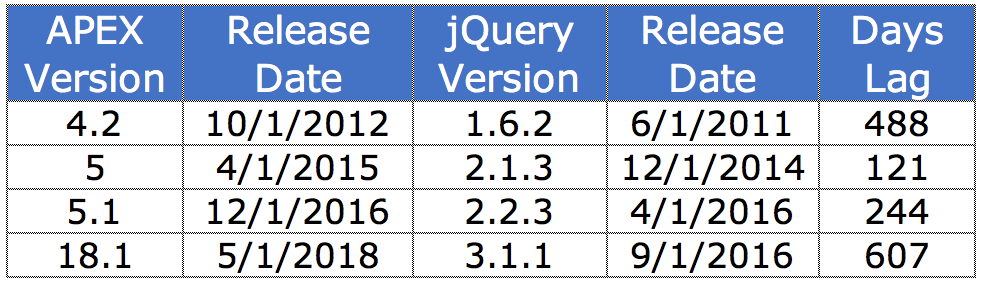
APEX 18.1 uses JavaScript, jQuery, jQuery UI, and JET. Custom code locks developers into specific technology versions, increasing upgrade costs. When APEX upgrades its jQuery version, your custom code may break.
Recommendation: Limit JavaScript to 15-20 lines per page. Consider Dynamic Actions as alternatives - they’re maintained by Oracle and upgrade gracefully.
2. Dynamic HTML (htp.p)

Mixing business logic with UI through hundreds of lines of htp.p statements creates maintenance challenges. This pattern:
- Makes code hard to read and debug
- Couples business logic with presentation
- Doesn’t leverage APEX’s built-in capabilities
Recommendation: Leverage the Universal Theme and APEX’s declarative components instead.
3. CSS

Custom styling is vulnerable to version changes. What looks perfect in APEX 5.1 may look broken in 18.1 because the underlying HTML structure changed.
Recommendation: Use CSS judiciously. The APEX team manages browser compatibility for the Universal Theme - let them do that work for you.
4. Plugins

Third-party plugins introduce dependencies you don’t control. Before using a plugin, evaluate:
- Developer’s track record for maintaining updates
- Underlying technologies used
- Whether the same result can be achieved declaratively
- Community support and documentation
How to Avoid Complexity
Responsibility falls on all stakeholders:
- Sponsors: Own ROI calculations. Question whether complex features deliver real business value.
- Designers: Design with APEX capabilities in mind. Know what’s easy vs. what requires heavy customization.
- End Users: Accept necessary trade-offs for ROI. Perfect can be the enemy of good.
- Developers: Code responsibly. Communicate concerns about complexity upfront.
Return on Investment

Only pursue complex approaches if they deliver measurable ROI.
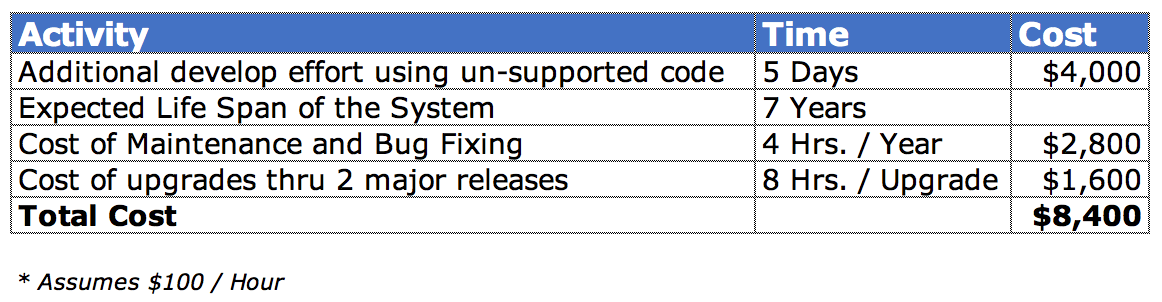
Consider the total cost over the application’s lifetime:
- Initial development cost
- Testing and QA
- Upgrade costs (every APEX version)
- Bug fixes and maintenance
- Knowledge transfer when developers leave
A complex feature that costs $5,000 to develop may cost $20,000+ over 7 years when you factor in maintenance and upgrades.
Conclusion
Building APEX applications responsibly means:
- Favor declarative over custom code - Oracle maintains declarative features
- Question complexity - Ask “Is this necessary?” before implementing
- Consider the lifecycle - Today’s clever code is tomorrow’s technical debt
- Communicate - Discuss trade-offs with all stakeholders
The best APEX applications aren’t those with the most impressive custom features - they’re the ones that solve business problems efficiently and remain maintainable for years to come.
Jon Dixon, Co-Founder JMJ Cloud